A Quick Refresher
You’ve already learned a lot in your first year about Bien-Air electric motors and attachments. Therefore, this course was designed as a refresher to help fill in gaps and provide a few important reminders as you begin your second year of dental school.
• Attachments at a Glance • Manual Maintenance •  Optima Overview •Â
The Attachments at a Glance
Re-Acquaint Yourself with the Team
This short video reminds you of the functionality and flexibility of your three attachments: The All Speed Red, the Slow Mo Pro, and the Closer.
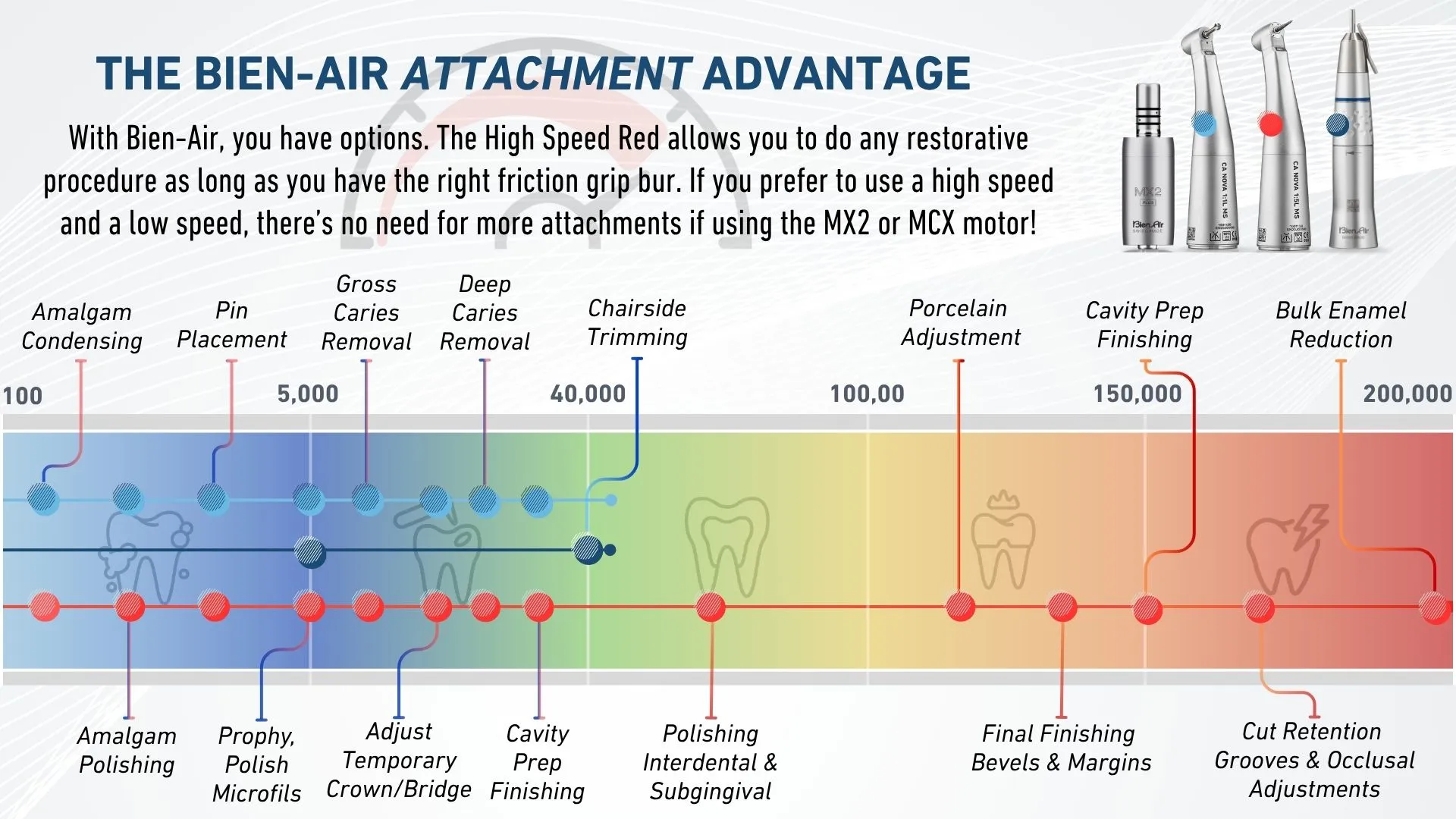
• The Low Speed Blue has a speed range of 100-40,000 RPMs with constant torque.
• Uses a latch grip bur.
• Works great for rotary endo and all low speed procedures.
• The High Speed Red has a speed range of 500-200,000 RPMs with constant torque.
• Uses a friction grip bur.
• The NOVA (pictured) has the smallest head size in it's class not requiring specialty burs.
• The PM EXT 1:1 has a speed range of 100-40,000 RPMs.
• Uses a straight type bur and can be used with a prophy attachment.
Almagam Condensing
- 500 RPM

s @ 100% Torque
NOTE: You can only run your attachments at this speed using the Optima INT and iOptima INT.
Almagam Polishing
- 1,000 RPM
s @ 100% Torque
NOTE: You can only run your attachments at this speed using the Optima INT and iOptima INT.
Pin Placement
- 2,000 RPM
s @ 100% Torque
NOTE: You can only run your attachments at this speed using the Optima INT and iOptima INT.
Prophy & Polish Gold and/or Microfils
- 5,000 RPM
s @ 100% Torque
Pin Hole Drilling & Gross Caries Removal
- 10,000 RPM
s @ 100% Torque
Adjust Temp Crown & Bridge
- 15,000 RPM
s @ 100% Torque
Deep Caries Removal
- 20,000 RPM
s @ 100% Torque
General Cavity Prep Finishing
- 35,000 RPM
s @ 100% Torque
Chairside Trimming & Denture Adjustment
- 40,000 RPM
s @ 100% Torque
Polishing Interdental + Subgingival & Eliminating Almagum Overhang
- 50,000 RPM

s @ 100% Torque
Porcelain Adjustment
- 125,000 RPM
s @ 100% Torque
Final Crown & Bridge Prep Finishing and/or Bevels + MarginsÂ
- 140,000 RPM
s @ 100% Torque
Cavity Prep Finishing Bevels + MarginÂ
- 150,000 RPM
s @ 100% Torque
Cut Retention Grooves and/or Occlusal Adjustments
- 160,000 RPM
s @ 100% Torque
Dental Reduction and/or Tooth Sectioning and/or Bulk Enamel Reduction
- 200,000 RPM
s @ 100% Torque
Manual Maintenance
Spray and Slay and Save!
Keeping your attachments maintained on a regular basis is a great habit to start. It will greatly increase the lifetime of your attachments and as a result, reduce repair expenses when they are out of warranty. The best part is it only takes a few seconds.Â
NOTE: We highly recommend you maintenance your attachments after you’ve used them at the sim lab, each day.
OptimaINT Overiew
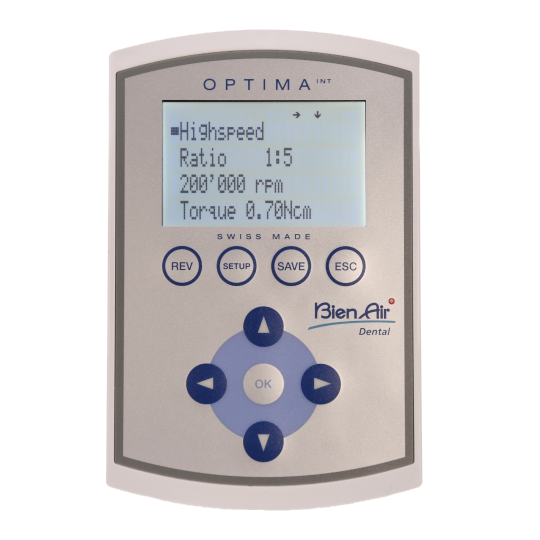
Below you’ll find a short video showcasing all of the important information about the OptimaINT and an interactive hotspot that you can click on to learn more about each of the buttons on the OptimaINT. If you’d like a one-page flyer, click here.
Cursor
• The black box is your cursor.
• When the black box is over text (like Highspeed), you can use the "Ok" button to select, or the left and right arrow to adjust.
REV = Reverse
• You can manually set reverse
• Safety Feature: Auto-reverse function in ENDO (when max torque is met)
SETUP
• Lots of great settings to adjust including light intensity, language, sound, and more!
• NOTE: This feature may be disabled for students.
SAVE
• Whenever you make a change in SETUP, press the SAVE button to make the change permanent.
ESC = Back
• This is your "Back" button, it will take you back to the previous screen
OK = SELECT
• Press this button to select what you want to adjust. Once you press it, you can use the Up, Down, Left, and Right arrows to adjust the settings.
You must log in and have started this course to submit a review.